
Portfolio
PwC - Request to Pay (RTP)
Request It was a brand-new internal procurement platform built from the ground up for PricewaterhouseCoopers, designed to give the firm's accountants a unified system for tracking spending and purchases across the full procurement lifecycle. Five specialized teams worked in parallel across front end, back end, logistics, and financial operations, all moving at the same sprint cadence toward a shared launch.
Key Takeaways
- Sole UX resource across five cross-functional agile teams building an entirely new enterprise platform from the ground up for PwC's internal accountant population. About the Engagement ↓
- Constant cross-team presence: flagging design violations, unblocking sprint tasks, and keeping UX quality consistent across an entire organization in simultaneous motion. Working Across Teams ↓
- Pitched and led a Lunch & Learn on BEM to eliminate "code soup" and prevent the ID and class collisions that were breaking keyboard navigation and screen reader behavior. BEM & Code Standards ↓
- Accessibility was court-mandated: PwC had pending litigation and a compliance deadline, making WCAG adherence a first-class engineering requirement from sprint one. Accessibility ↓
- A critical taxonomy field was on the verge of being cut entirely. Built a custom typeahead autocomplete from scratch, shipped it on time, and watched it become a reusable pattern across the platform. Category Search ↓
About the Engagement
PricewaterhouseCoopers needed an entirely new internal procurement platform built from the ground up: Request It. The platform was designed to give the firm's global accountant population a unified system for tracking spending and purchases across the full procurement lifecycle, from initial request through payment. I served as the sole UX resource embedded across five specialized agile teams, each working on a distinct domain: front end architecture, back end services, logistics workflows, financial operations, and reporting. All five teams ran on the same sprint cadence, advancing in parallel toward a shared launch target. The engagement spanned 2018 to 2020, when the COVID-19 pandemic brought the project to a halt before the platform reached full production launch.
Working Across Teams
With five teams building simultaneously and just one Senior UX Architect alongside me for a project of this scale, the challenge was not just designing for the product but being present everywhere the product was being built. That meant attending sprint ceremonies across multiple teams, reviewing work for design violations, unblocking developers mid-sprint on interaction questions, and serving as the connective tissue that kept UX quality consistent across an organization in simultaneous motion. The role required both broad product context and the ability to shift from strategic design decisions to granular implementation questions within the same day. A significant influence during this engagement was John Costa, a senior UX architect whose mentorship deepened my understanding of design systems thinking, accessibility patterns, and the downstream engineering consequences of design decisions.
BEM & Code Standards
Across five teams writing CSS and HTML independently, the project's markup was accumulating ID and class naming conflicts at an accelerating rate. Shared component styles were being overridden unpredictably, JavaScript was targeting the wrong elements, and the accumulated mess of inconsistent naming conventions, what I informally called "code soup," was silently breaking keyboard navigation and screen reader behavior across the application. Rather than treat this as isolated team issues, I proposed and led a Lunch & Learn session on BEM (Block Element Modifier), the structured CSS naming methodology that prevents exactly these kinds of collisions by making component scope explicit in the class name itself. The session gave all five teams a shared naming language, a clear ruleset for scoping styles, and immediate tools for untangling existing conflicts. Adoption was collective, and the naming collisions that had been generating invisible accessibility failures stopped.
Accessibility
Accessibility on Request It was not an afterthought or a sprint-end checklist item. PricewaterhouseCoopers was managing pending litigation with a hard compliance deadline, making WCAG adherence a first-class engineering requirement from sprint one. Every new component had to meet keyboard navigation, focus management, and screen reader requirements before clearing review. It was built in during initial development, not retrofitted after the fact. The court mandate compressed what is often treated as a nice-to-have into a non-negotiable constraint, which ultimately produced a more rigorously accessible product than most enterprise internal tools achieve. The BEM work directly supported this outcome: consistent naming and scoped styles are prerequisites for predictable keyboard and ARIA behavior across a large shared codebase.
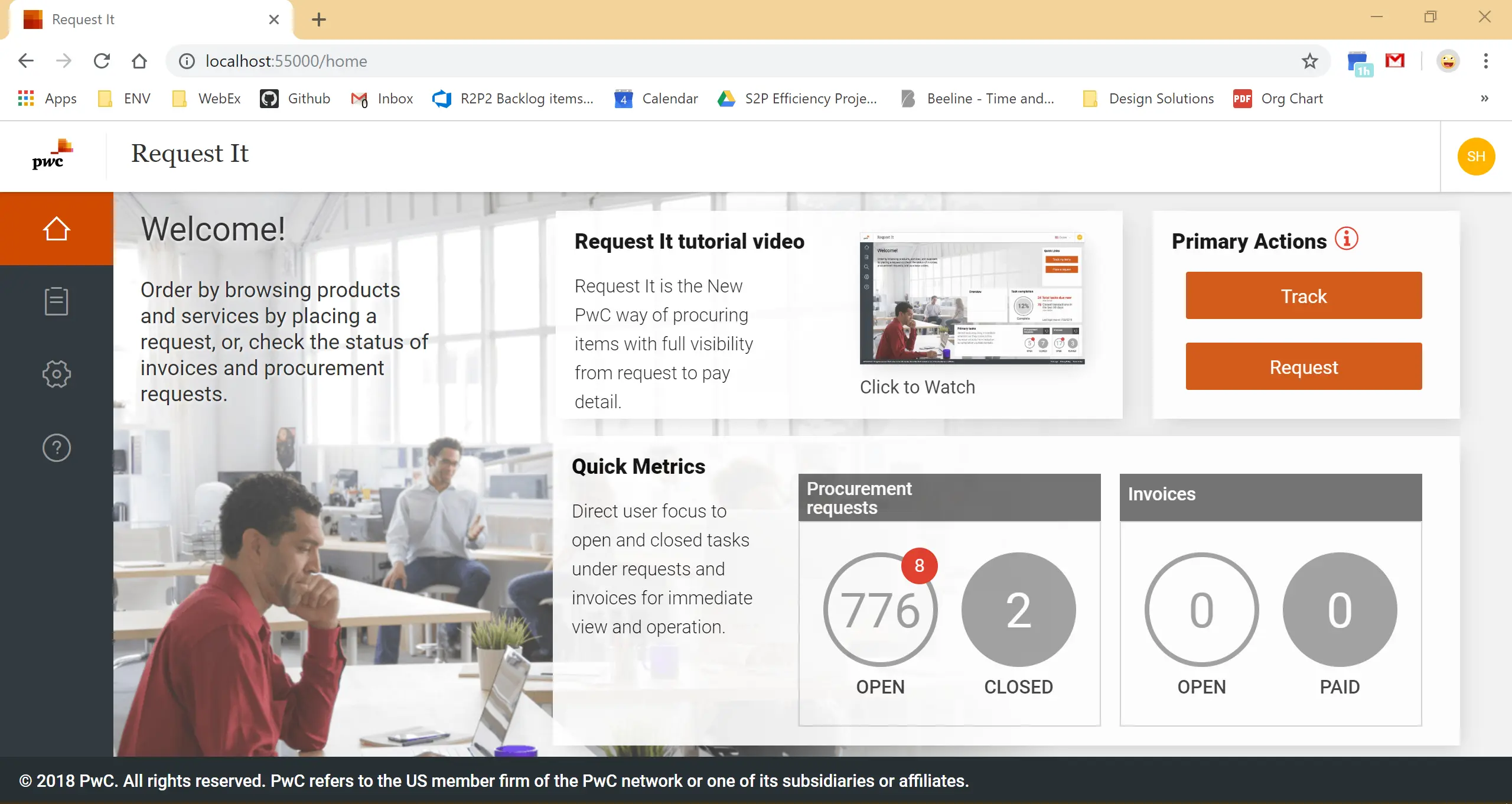
Request It - Homepage & Dashboard
The Request It homepage was designed to orient users immediately - surfacing the two core actions (Track and Request) in a prominent right-rail, pairing them with at-a-glance procurement and invoice status counts so users could assess their workload before taking a single click. A welcome panel with embedded tutorial video addressed onboarding without interrupting the primary workflow. The entire UI was built on a custom Sass architecture created from scratch - establishing a scalable, component-driven foundation that maintained PwC brand consistency across the application while giving development teams a clean system to build on. For users, the combination of immediate status visibility and embedded onboarding meant the tool was learnable at first contact, with no training session required before a meaningful first action.
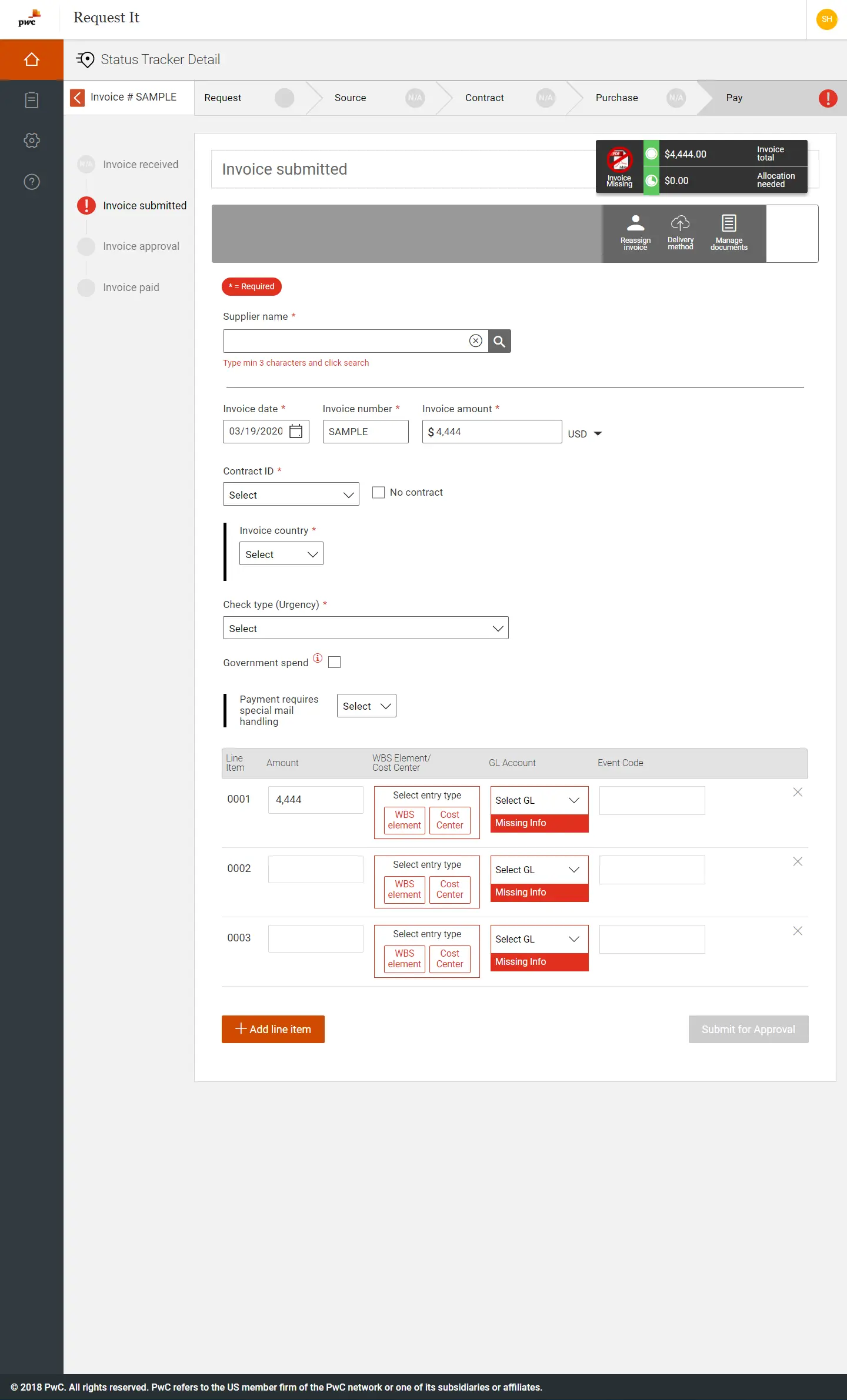
Invoice Submission: Status Tracker & Form Detail
At PricewaterhouseCoopers I designed a persistent multi-step workflow tracker for the Request It platform that gave users simultaneous visibility across a full Request, Source, Contract, Purchase, and Pay pipeline while also surfacing granular status detail on their current transaction, giving two lenses on the same workflow without cognitive overlap. The form itself manages a wide range of conditional inputs: supplier lookups, Work Breakdown Structure (WBS) Element and General Ledger (GL) Account field data, urgency classifications, and special handling flags, all surfacing inline validation states that communicated errors in context rather than on submit. Building this in Angular/Kendo UI required precise management of dynamic row generation, cross-field validation state, and a submit gate that enforced completeness before allowing downstream approval, all while maintaining accessibility and keyboard flow across a deeply nested component tree. The component-driven architecture was built for configurability, allowing development teams to scale and extend the system consistently across five cross-functional agile teams. The component architecture proved its value in practice: consistent, configurable, and adopted cleanly across all five cross-functional agile teams.
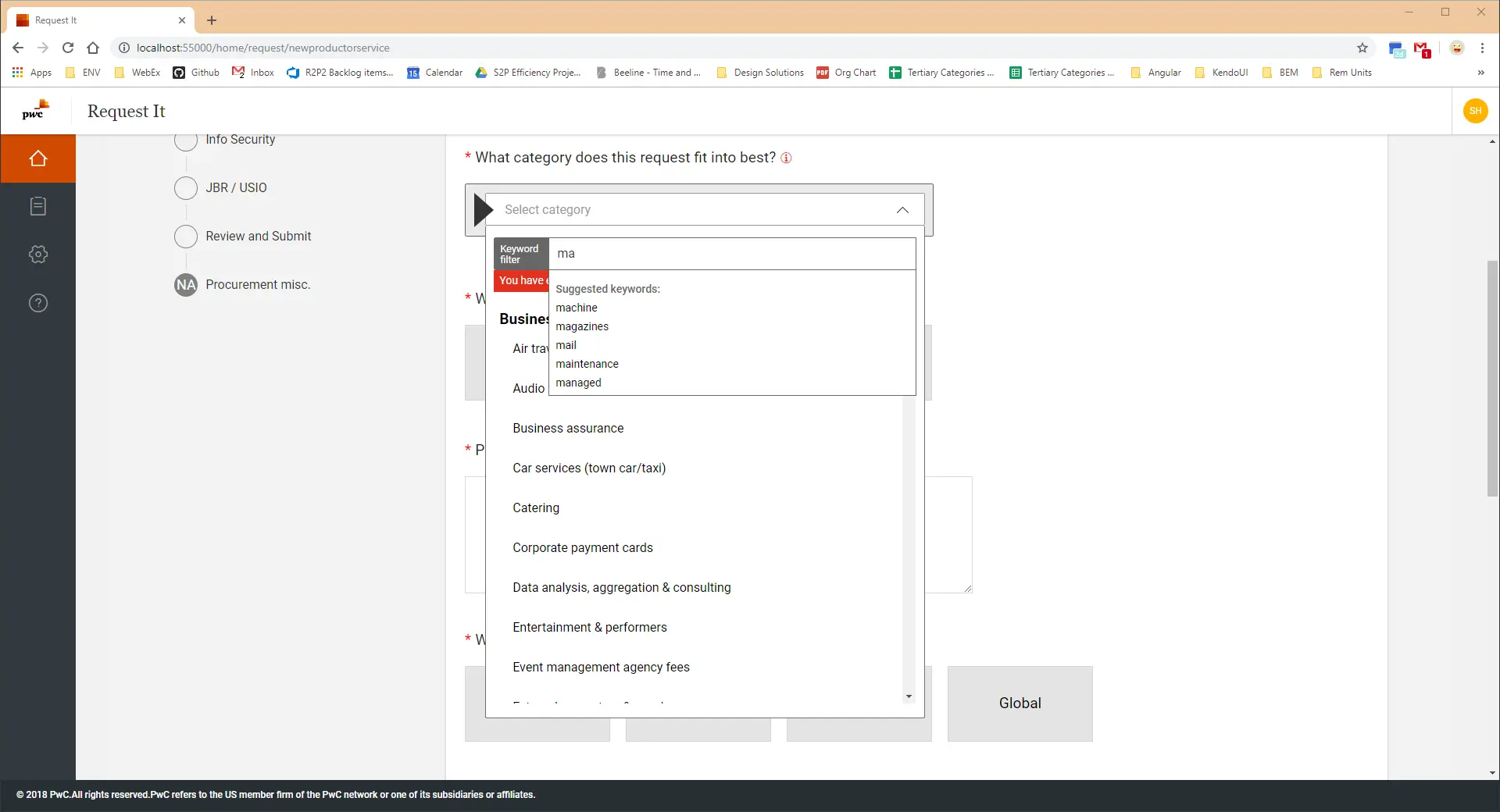
Category Selection - Dropdown Autocomplete Search
A critical taxonomy field required users to search and select from thousands of nested procurement values in real time. Nothing off the shelf could handle it: every existing component option introduced input event conflicts that made the interaction unreliable, and the feature was on the verge of being scrapped entirely. With a hard deadline approaching, the UX and development team made the call to build something custom rather than cut it. We designed and built a bespoke typeahead autocomplete field from scratch, resolving the event conflicts that had blocked every previous attempt. It shipped on time, felt native to the platform, and became a reusable pattern adopted across other complex fields in the application. Sometimes the best research outcome is proving that the thing worth saving is worth fighting for.
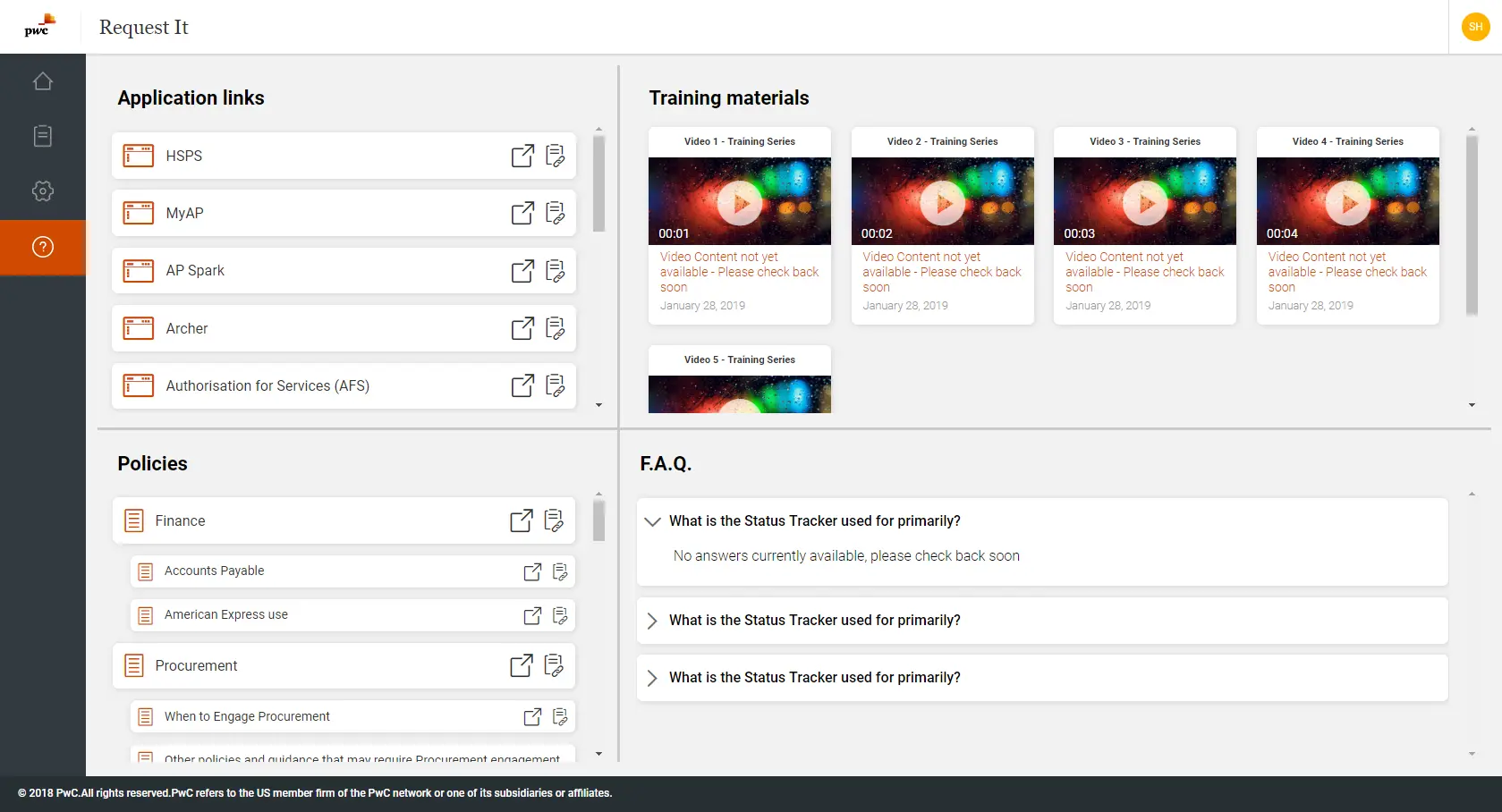
Request It - FAQ & Resource Hub
The Request It resource hub consolidated everything a user might need into a single, quadrant-based layout - Application links, Policies, Training materials, and an FAQ accordion all living on the same screen without competing for attention. Each training video opens in its own modal, keeping users anchored to the page rather than bouncing them to an external player. The FAQ section uses a clean accordion pattern to surface answers on demand. Building the layout from scratch meant engineering each quadrant to meet accessibility standards independently - keyboard navigation, focus management, and ARIA roles all had to work correctly across four distinct interaction patterns on a single view.